
Quick Reply for SmartWatch 2
**QuickReply is only for Sony SmartWatch 2***** 10 editable Predefined Replies added****** SMS integration added ****** Follow the XDA thread for updates and discussions***http://forum.xda-developers.com/showthread.php?t=2700771
"Quick Reply for SmartWatch 2" enables to receive Whatsapp and SMS alerts, and send quick replies from your connected Sony Smart Watch 2 either by typing custom messages or by using predefined message templates.(Your phone must be rooted with latest BusyBox installed )
Steps:1.
Grant Root access forever2.
Enable "Quick Reply for SmartWatch 2" under Accessibility Services.
Disable any other Whatsapp services(reboot the phone if required)3.
Install BusyBox from PlayStore4.
Disable Whatsapp Media AutoDownload completely to avoid crashes/false notifications
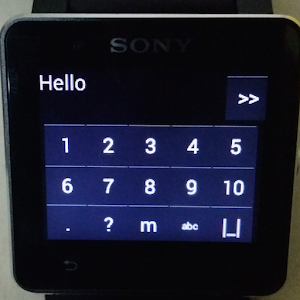
To reply from SW2, click the menu during any message and hit phone icon to send predefined messages or hit the keyboard button to type in the message.
Predefined message instructions:Swipe left / right to choose among different message templates and hit send!
Keyboard instructions :Swipe Up for upper case alphabetsSwipe Down for lower case alphabetsSwipe Left to delete textSwipe right for spaceLong press to toggle numbers and symbolsHit the >> button to send the message.
Note: You need a rooted phone to read and reply to notifications!*** If you are facing crashes send us a bug report!***
Smart Connect extension for SmartWatch 2Smart extension for SmartWatch 2LiveWare extension for SmartWatch 2
About Quick Reply for SmartWatch 2
- Package name (App ID)
- com.ingeniousapps.hellosmartwatch
- Available on
- Google Play
- Price
- Free
- Version
- v3.1
Looking for the Quick Reply for SmartWatch 2 APK?
The safest way to get Quick Reply for SmartWatch 2 (com.ingeniousapps.hellosmartwatch) on your Android device is to install it directly from Google Play — you'll always get the latest official version, automatic updates, and no risk of modified or infected APK files from third-party sites.
Social Features
Connect and share with friends and the community.
Gaming Features
Enjoy immersive gaming experience with various game modes.
Weather Features
Get accurate weather forecasts and real-time updates.
See Quick Reply for SmartWatch 2 in Action


Frequently Asked Questions
Is Quick Reply for SmartWatch 2 free?
Yes, Quick Reply for SmartWatch 2 is free to download and install on Android through Google Play.
How do I install Quick Reply for SmartWatch 2 on Android?
Open Google Play on your Android phone or tablet, search for Quick Reply for SmartWatch 2 or tap the Google Play button on this page, then tap Install. The app downloads and installs automatically.
What is com.ingeniousapps.hellosmartwatch?
com.ingeniousapps.hellosmartwatch is the App ID (package name) of Quick Reply for SmartWatch 2 on Google Play. Every Android app has a unique package name, and it is the safest way to verify you are installing the official app.
Is Quick Reply for SmartWatch 2 safe to download?
Installing Quick Reply for SmartWatch 2 from Google Play is the safest option: you get the official version, verified by Google Play Protect, with automatic updates. Avoid APK files from unofficial third-party sites.
Get Quick Reply for SmartWatch 2 Today
Quick Reply for SmartWatch 2 for Android — free download on Google Play.
Compatible with Android phones and tablets — available on Google Play.
Ask AI about this app
Get instant answers about features, tips and more from popular AI assistants.